Theme Check
Shopify Theme Check
Find what’s broken in your Shopify theme
Upload your theme export and get a readable report of every problem we find — the file, the line, and what to change. No app, no store access, nothing to configure.
- No Shopify login
- No app to install
- Your theme is deleted within 30 days
How it works
From export to fix list in three steps
No account, no configuration. The whole thing takes about a minute, most of it waiting on Shopify's export email.
Export your theme
Download the theme as a .zip from your Shopify admin. Two clicks — the guide below shows exactly where they are.
Upload the archive
Drop the .zip in the box above. It is unpacked into a temporary folder, every Liquid file is scanned, then that copy is deleted; the .zip goes after 30 days.
Work through the report
Each finding names the file and the line. Filter by severity or by check, and start with the errors.
Step by step
How to download your theme file
Shopify keeps the export behind a menu and then emails it to you. Here is exactly where to click.
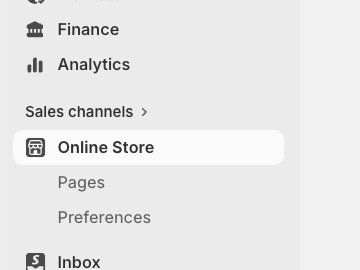
Open Online Store
The export lives on the same page as your themes.
- In the admin sidebar, click Online Store under Sales channels.
- Your themes are listed on that page — no submenu needed.
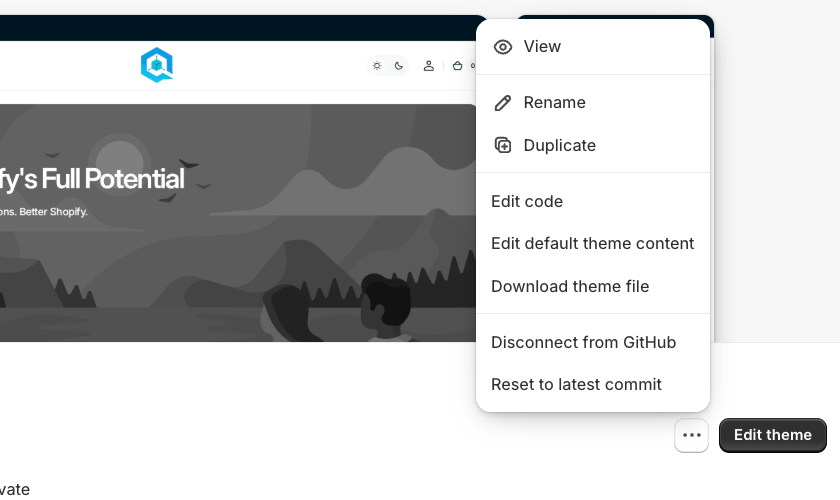
⋯ → Download theme file
This works on the live theme and on any draft.
- Find the theme you want to check — the live one is tagged Active.
- Click the ⋯ button next to Edit theme, bottom-right of the theme card.
- Choose Download theme file.
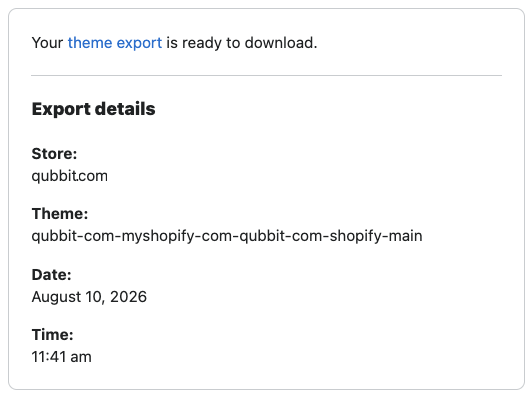
Grab the .zip from your email
Shopify does not hand the file over directly.
- Shopify emails a download link to your staff account address — usually within a minute.
- Click theme export in that email to download the archive.
- Drop it in the box at the top of this page, still zipped.
What we look at
Checks that run on every upload
Liquid, JSON and locale files are all scanned. Every finding lands in the report with its file, its line and the rule that raised it.
FAQ
Before you upload
Do I need to install anything?
No. You upload a theme export and we do the rest — no app, no Shopify login, no access to your store.
What happens to the file I upload?
The archive is unpacked into a temporary folder, scanned, and that copy is deleted as soon as the scan finishes. The .zip itself is kept for 30 days in private storage, in case a report needs checking, then deleted for good. The report stays: the findings, plus the single line of code each one quotes.
How large can the upload be?
Up to 25MB, comfortably more than a real Shopify theme export. Anything bigger is rejected before it is read.
Can I share the report?
Yes — every report gets its own URL. It is unlisted rather than private, so anyone with the link can open it.
Is this the full Theme Check rule set?
Not yet. Today it runs the four checks listed above across every Liquid file in the theme. More rules are on the way.